All services

Time to move off WordPress?

WordPress isn't bad, and a well-maintained WordPress site can be safe. But it takes a lot of maintaining. If yours has become slow, costly or a worry, there are now simpler ways to run a website, and you can move without losing your Google rankings.

Worth moving if your site:

  • It is slow, especially on a phone
  • It costs more and more to look after
  • It runs on a long list of plugins, and nobody is sure which ones are needed
  • It is on an older version of PHP, or you don't know which version it is on

Before you leave WordPress: a checklist

Whoever moves your site, these are the things to gather first. Most take a few minutes, and they stop anything getting lost on the way.

If you'd rather not do it yourself, it's the first thing I do on every move.

  1. Write down what every plugin does

    Go through the plugins page and note the job each one does, not just its name: forms, SEO, caching, bookings, galleries, backups. Every job needs a home on the new site, and some won't be needed at all.

  2. Save a list of every URL

    Pages, posts, categories and images, from your sitemap or a crawl of the site. Each address needs a permanent redirect to its new home, and the pages Google sends most visitors to matter most.

  3. Export your form entries

    Some form plugins, such as Gravity Forms and WPForms, keep past enquiries in the WordPress database. Export them before the old site is switched off, along with any customer or order records you need.

  4. Note your tracking

    Your Google Analytics or Tag Manager IDs, who has access to Search Console, any advertising pixels and your cookie banner, so they are all in place on launch day.

  5. Check your email and DNS

    Find out who controls your domain's DNS and where your email is hosted. If your email runs through your WordPress host, moving the website mustn't take your inbox with it.

  6. Check your licences

    List any paid theme and plugin licences and when they renew, so you can cancel the ones you won't need before you pay for another year.

Will I lose my Google rankings?

Protecting them is the main job of a migration. Every old address is mapped to its new one with a permanent (301) redirect, the content and page titles carry over, and I check the site's SEO before and after launch. Nobody can promise what Google will do, but a move done this way gives it no reason to drop you.

The full step-by-step plan is in moving off WordPress without losing rankings.

Why this keeps happening

A WordPress site isn't one thing. It is a stack of parts, each looked after by someone different.

Any one of them out of date is a way in. You can do everything right and still be exposed because a plugin hasn't been updated, or your host hasn't installed a fix yet.

  1. Plugins Looked after by A different developer for each one The most common way in
  2. Your theme Looked after by The theme's developer One more thing to keep current
  3. WordPress itself Looked after by The WordPress project Needed its own security fix in October 2026
  4. PHP and the server Looked after by Your hosting company Where the October 2026 PHP flaws were

The alternative: no PHP server to patch

I move sites to one of two modern setups. Which one depends on how often you change your site.

If your site rarely changes

A fast static site

Your pages are built once and served as plain files. There is no login, no database and no plugins for anyone to attack.

  • About as fast as a website can be
  • Almost nothing to keep updated
  • Changes are made by me, whenever you need them

If you edit your own pages

EmDash

Cloudflare's open-source content management system, launched in April 2026 and described as WordPress's "spiritual successor". You still log in and edit your pages. What sits underneath is different.

  • No PHP. It runs on Cloudflare's global network, so it is fast everywhere and protected by Cloudflare by default
  • Each plugin runs in its own sandbox and must say up front what it can access, so a bad plugin can't take over the site
  • Open source under the MIT licence, with a stable 1.0 release
  • Hosting is often cheaper than managed WordPress hosting

Either way, your WordPress pages, posts and images can be imported. Themes and plugins are rebuilt rather than copied.

EmDash and WordPress, side by side

Real screens, not mock-ups. Day to day the two feel alike: you log in, change a page and publish. The difference is in what you have to keep on top of.

Changing a page

EmDash: two ways to change a page
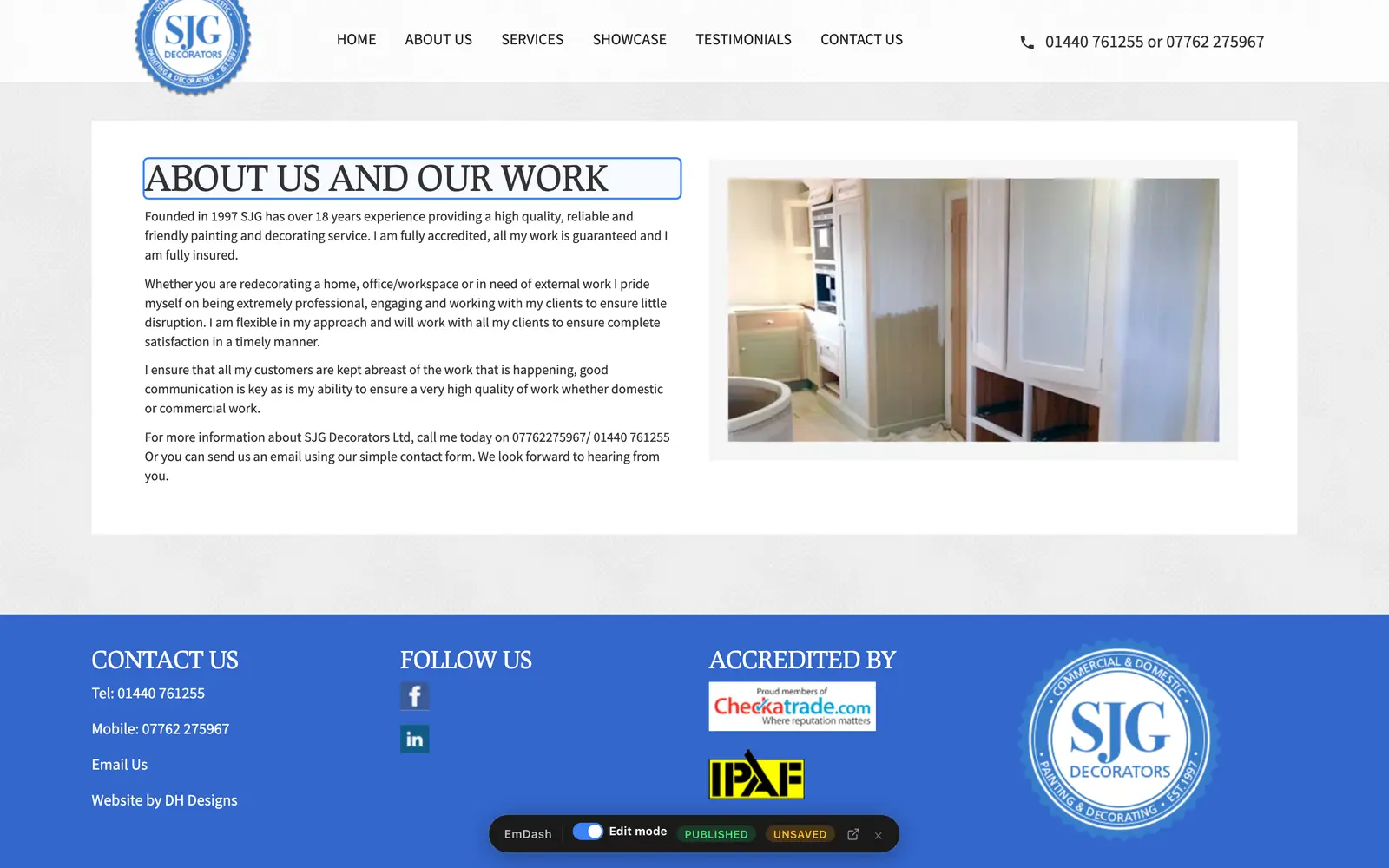
A page of a decorator's website with its heading being typed into directly, and a small EmDash toolbar at the bottom reading Edit mode, Published, Unsaved
EmDash: edit on the page Switch on Edit mode, click the words and type. It saves as a draft until you publish.
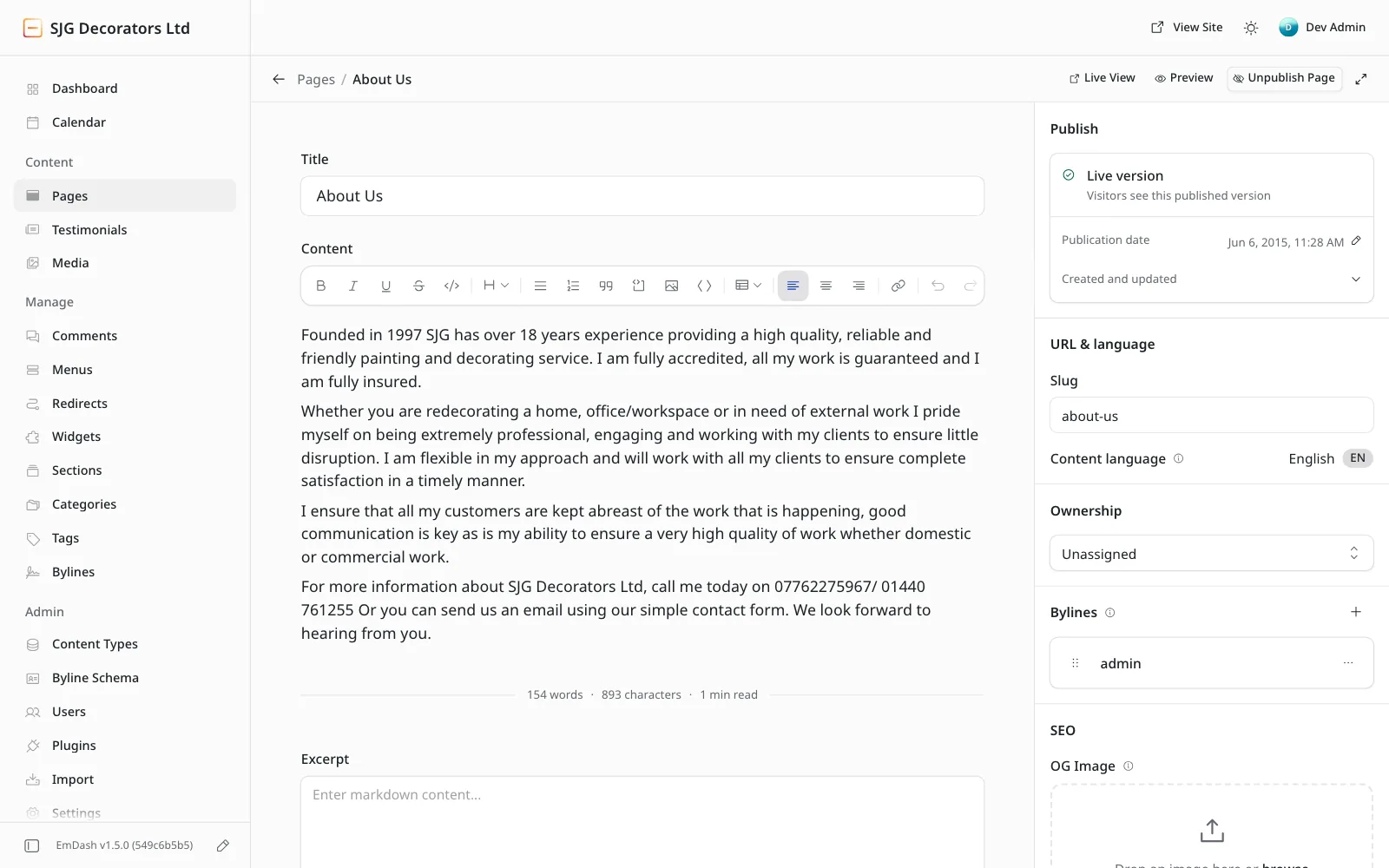
The same page open in the EmDash dashboard: a menu down the left with Pages selected, a Title box, a Content editor with a toolbar for bold, italic, headings, lists, images and links, and a Publish panel on the right
EmDash: or edit in the dashboard, like WordPress The same page, opened from the Pages list. You get a title box, the content in an editor with a formatting toolbar, and a Publish panel beside it.
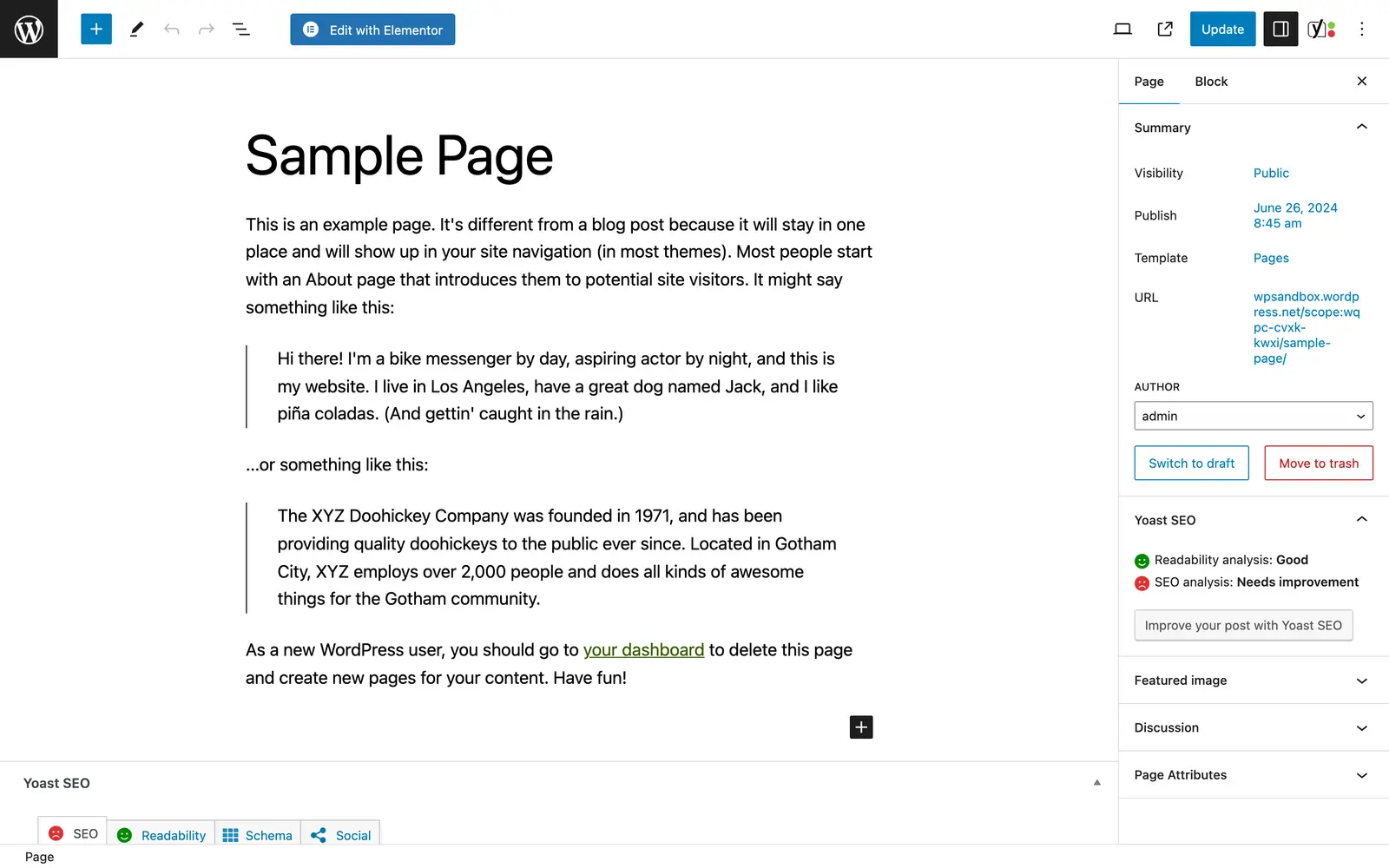
The WordPress block editor open on a sample page, with extra buttons and panels added by the Elementor and Yoast SEO plugins
WordPress You edit in the admin area, in the block editor. Plugins add their own buttons and panels around it.

Plugins

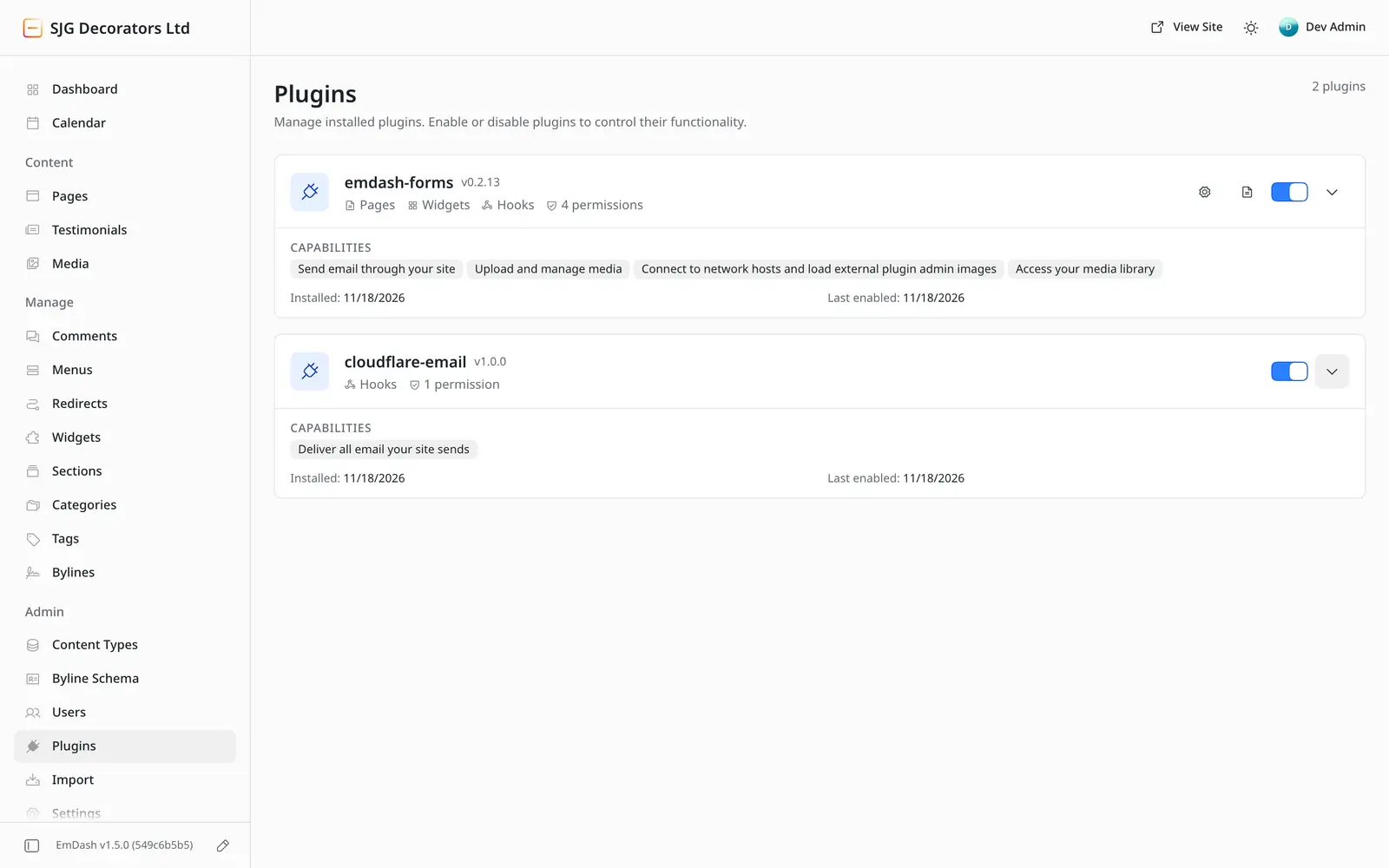
The EmDash plugins screen showing two plugins, each with a switch and a list headed Capabilities, such as Send email through your site
EmDash Each plugin lists, in plain English, what it is allowed to do.
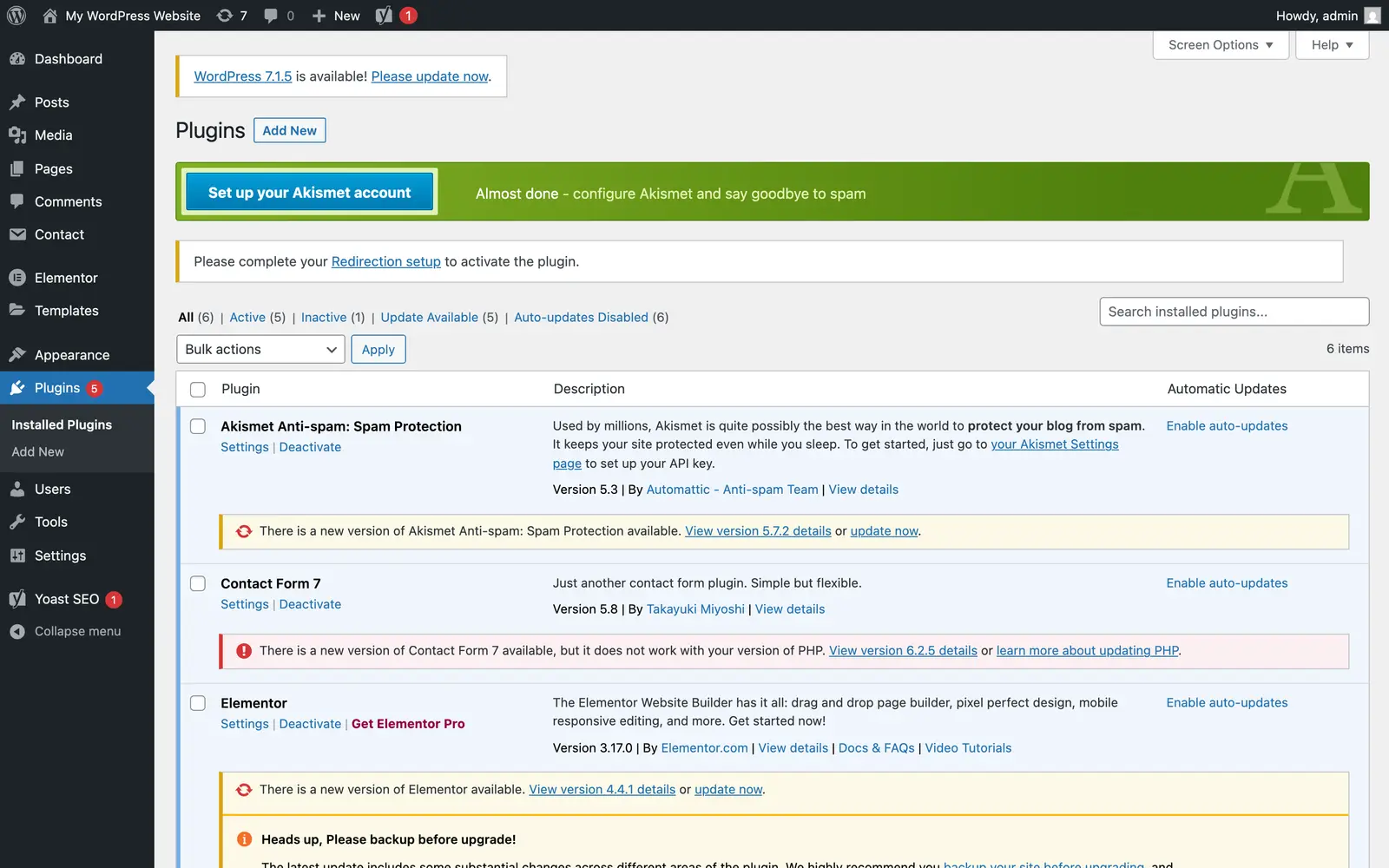
The WordPress plugins screen showing five plugins with updates available, one marked as not working with this version of PHP, and a notice that a new version of WordPress is available
WordPress Every plugin is updated separately. Here five have updates waiting, and one can't be updated until PHP is.

Logging in

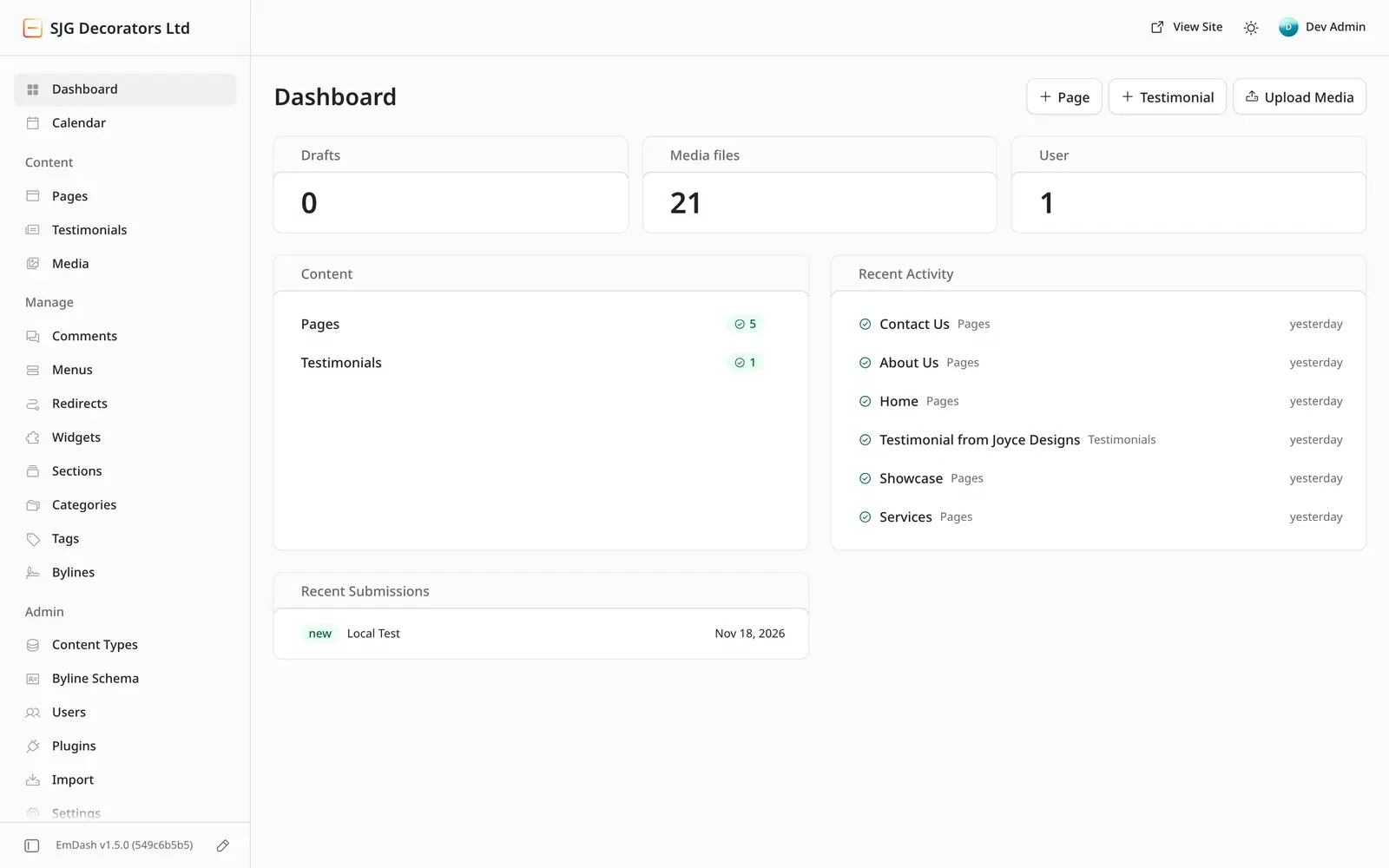
The EmDash dashboard: counts of drafts and media files, a list of pages and recent activity
EmDash The dashboard shows your content and what changed recently.
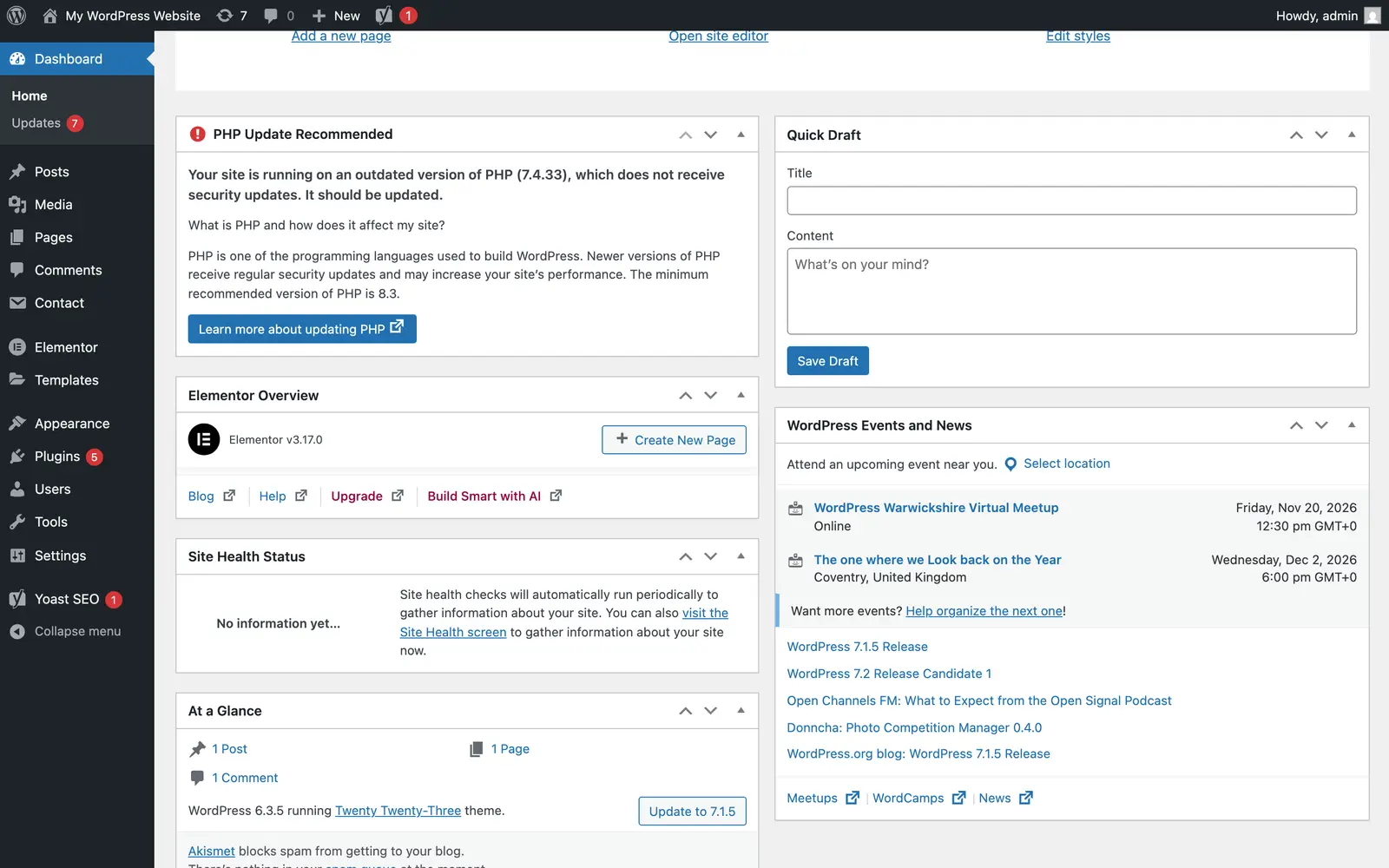
The WordPress dashboard with a panel headed PHP Update Recommended, saying the site is running on an outdated version of PHP which does not receive security updates
WordPress WordPress warns you when PHP is out of date, but only your hosting company can update it.
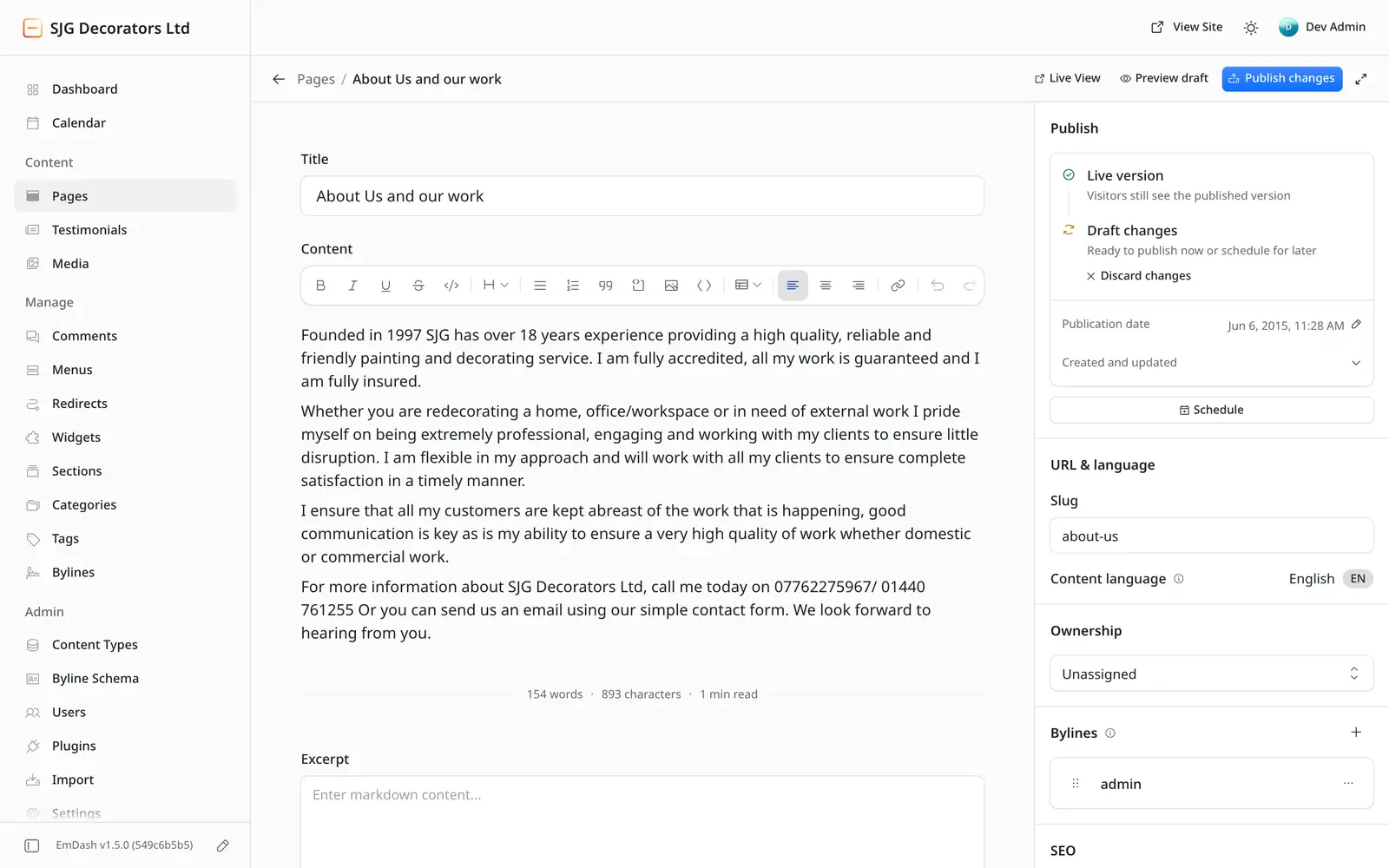
The EmDash page editor with a Publish panel showing a live version, draft changes ready to publish or schedule, and buttons to preview, schedule and discard
EmDash Drafts, scheduling and revisions work as you'd expect. Visitors keep seeing the live page while you work on a draft, and you can publish it now, schedule it or throw it away.

The EmDash screens are from a site I built, running on my own machine. The WordPress screens are from a fresh install in WordPress Playground, left on older versions on purpose (WordPress 6.3, PHP 7.4 and five popular plugins a few releases behind) to show what a site looks like once updates have slipped. Nothing in any of them has been edited.

EmDash and WordPress compared
What EmDash WordPress
Who patches what There is no PHP. On Cloudflare there is no server of your own to patch either. EmDash and its plugins still get updates, and I apply those. Your hosting company patches PHP and the server. WordPress, the theme and every plugin are updated by you, or by whoever looks after the site.
Speed Runs on Cloudflare's network, so pages are served from somewhere close to the visitor. PHP builds each page when someone asks for it, unless caching is set up, and each plugin adds its own weight.
Security Plugins can run in a sandbox of their own, and each declares up front what it is allowed to touch. A plugin can reach the whole database and every file, so one plugin with a flaw can expose the entire site.
Editing In the admin area or directly on the page, with drafts, revisions and scheduled publishing. In the admin area, with drafts, revisions and scheduled publishing.
Ongoing costs Hosting, which is often cheaper than managed WordPress hosting. EmDash itself is open source and free to use. Hosting, any paid plugins and themes, and the time it takes to keep everything updated.
Track record Launched in April 2026. Stable, but young: far fewer plugins, so more is built to order. More than twenty years old, with a plugin for almost everything and plenty of people who know it.

Keep everything you have

Moving off WordPress doesn't mean starting again. Whatever your site does for you now, the new one does too.

Two examples of tools I've built that do the job of a paid plugin: a window and door designer for installers, and the quote calculator that prices my own work.

Contact and quote forms
Rebuilt on the new site and sent to the same inbox.
Bookings and appointments
Recreated on the new site, or connected to the booking system you already use.
Your shop
Products, customers and order history moved across where the platforms allow. For a small range, taking payment through Stripe may be all you need.
Integrations
Newsletter sign-ups, your CRM, analytics and anything else the site feeds are reconnected and tested.
Paid plugins
Often replaced by something built for the job, with no licence to renew.

Running WooCommerce? You might not need a full shop.

If you sell a small range, take deposits or bookings, or sell vouchers, tickets or downloads, a fast website that takes payment through Stripe can replace the whole shop.

There is no monthly platform fee and no payment plugin to keep updated. Customers pay on a secure checkout page run by Stripe, and you pay Stripe's standard card fees on each sale. A large catalogue, stock in several places or marketplace selling still calls for a full shop platform, and I'll say so if that's you.

Do you need a full online shop?

How I move a site

I'm Dan Hutton, a web developer in Wisbech, Cambridgeshire. I look after WordPress sites and I move businesses off them. You deal with me the whole way through.

WordPress migrations from £795, with a fixed written quote after the health check.

It protects your customers too Your website holds other people's details: enquiry forms, accounts, orders. Keeping it secure protects their data as well as yours, which matters for trust and under UK GDPR.

  1. A free health check

    I look at your current site: speed, security and how it is set up. The check already flags WordPress and the PHP version it runs on.

  2. A plan that keeps your rankings

    Every address on the old site is listed and pointed at its new home with a permanent redirect. The content stays the same, and the SEO is checked before and after.

  3. Your content moved across

    Pages, posts and images are imported. Themes and plugins are rebuilt, not copied, which is the moment to drop the ones you never needed.

  4. Launch

    The new site goes live on your existing domain. I check the redirects, forms and tracking on the day.

  5. Care afterwards

    I keep an eye on the site and you have someone to call. There is far less to patch, so far less to go wrong.

The headlines

In October 2026 a flaw in the software underneath WordPress made the news around the world. These are real headlines, linked to where they were published.

What happened in October 2026

Two serious flaws were found in PHP, the programming language WordPress runs on. They became known as PHP2Shell.

Both let an attacker run their own code on a web server without logging in. They were rated 9.2 out of 10 for severity (CVE-2026-109618 and CVE-2026-109619).

  1. 21 October Fixes were released in PHP 8.5.12, 8.4.27, 8.3.36 and 8.2.35. Older versions only got minimal emergency patches, because PHP no longer supports them.
  2. Within days Cloudflare reported attack traffic against its customers, and researchers confirmed successful attacks on unpatched test servers.
  3. 28 October WordPress itself needed a separate security fix (WordPress 7.1.4).

The part that surprises people Updating WordPress doesn't fix a flaw in PHP. The fix has to be installed on the server, so on most hosting you are waiting for your hosting company to do it.

Questions people ask

Will I lose my Google rankings?

Protecting them is the main job of a migration. Every old address is mapped to its new one with a permanent (301) redirect, the content and page titles carry over, and I check the site's SEO before and after launch. Nobody can promise what Google will do, but a move done this way gives it no reason to drop you.

Can I still edit my own pages?

Yes. With EmDash you log in and edit pages and posts much as you do in WordPress. If your site rarely changes, a static site with no login at all is the simplest and safest choice, and I make changes for you when you need them.

How long does it take?

Typically six to ten weeks, depending on the size of your site and how much it does. I look at the current site first, and you get a timeline in writing before anything starts.

What about WooCommerce shops?

A WooCommerce shop moves to Shopify or to a modern headless shop, depending on what you sell and how. If you only sell a few things, a simple site that takes payment through Stripe may be enough. The e-commerce page has the details.

What if I want to stay on WordPress?

That is a reasonable choice, and a well-maintained WordPress site can be safe. My website care plan covers updates, backups, monitoring and security for WordPress sites, including ones I didn't build.

Is WordPress safe?

It can be, if every part of it is kept up to date: PHP and the server, WordPress itself, the theme and every plugin. The trouble is that those parts are looked after by different people, and one that falls behind is enough to let someone in.

Find out where your WordPress site stands.

Type in your website and I'll send you a free health check. It covers speed, SEO, security and mobile, and it flags WordPress and the PHP version your site is running.

Prefer to talk?

Or send a project enquiry

Where should I send your report?

I'll check its speed, SEO, security and mobile setup and email you a plain-English report. Free, with no obligation. I'll only use your email to send the report and follow up once.